
 Reply With Quote
Why the hell is this not a "Sticky" yet?


First off never make changes yourself in the fuel maps unless you know what your doing and never take away fuel anywhere in the maps until your an expert and you know exactly what your doing.
Second, read the tuning guide several times first, it will answer most questions you will have.
This may seem daunting but after you do it a few times its very easy and addictive.
What is the purpose of tuning? The purpose of tuning is to get the bike with your mods to run stoich threw all the tps positions and rpm range. Stoich or Stoichiometric (14.7) is the ideal combustion ratio for a gas combustion engine.
Most of what I have learned is from Gbailis, Xopti, and Gemini on a few other sites so im just passing on the information that I know and how I map it. It has significantly improved the performance of my bike.
What you need. A portable recording device like a Palm OS or Laptop, ecmspy and cable and Megalog viewer.
Ok so you did the tps rest, checked your static timing and did a diagnostic test and are ready to tune. Set your AFV to 100% its right next to your tps reset button on the diagnostic page.
First time I tuned I left the eeeprom untouched and logged it. I did not ride it for the first tune I just free reved it in my garage for a few min then ran the ve revised the map then took it for the first ride. It added a lot to the fuel maps and got everything in a safe range. You dont need to do it but I liked the way it turned out. Make sure you save your stock eeeprom and maps in a safe place, I bought a 1 gig flash drive and saved it to that and my wifes computer also two places on my computer and emailed it to myself just to be sure. I also saved my first tune map in the same locations just in case.
Then save your fuel maps in the Kenfield folder by going to the map page in ecmspy and click (save as) then make a good name for your first map and save it in ecmspy/kenfield folder.
hook the bike up and make sure the keys are depressed and the bike is getting real time info. On the overview page You should be able to twist the throttle and see the tps and rpm move. Then depress the button that looks like a floppy disc. It should go to a green check mark and your logging. Put your laptop in you back pack or secure it to your bike and take a ride.
Ride the bike around going threw the gears and the rpm range. First go threw it slow and then fast making sure to try to never roll off the throttle but to close the throttle fast on deceleration. Your going to log a lot so a short first ride is fine just make sure you go threw the gears a few time and take it up to about 5k in the rpms.
When you return shut the bike off and press the floppy disc so it goes to a red X.
Now on your computer click on-
my computer
disc drive C
ecmspy floder
Megalog folder
and click on the folder that looks like this
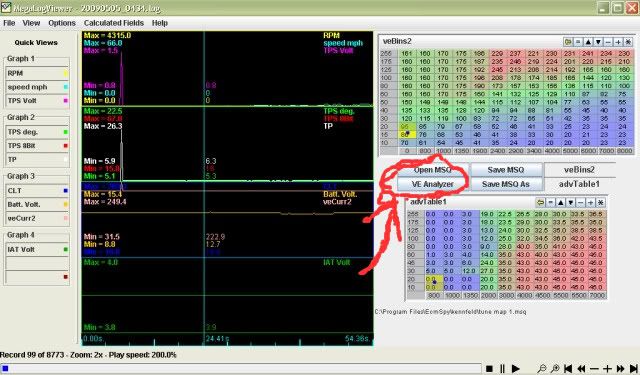
Click on open msq the map is located in, Local C: drive, program folder, ECMspy folder, Kenfield folder. Remember when you saved your fuel map into that folder. This is what your going to change.
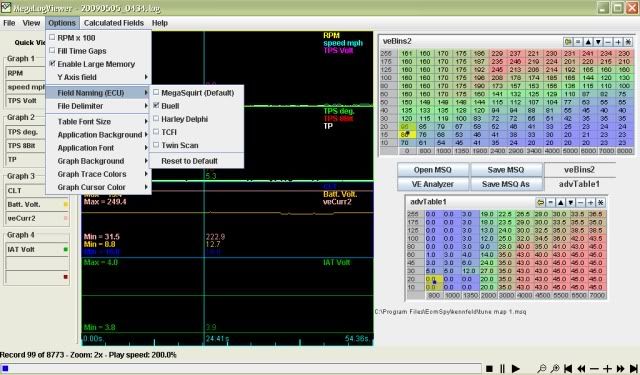
Click on Buell
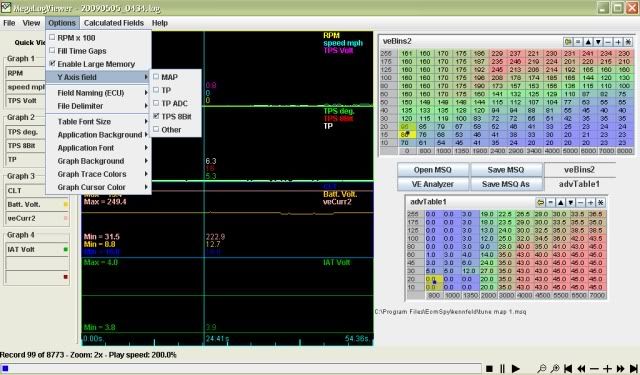
Click on TPS 8bit
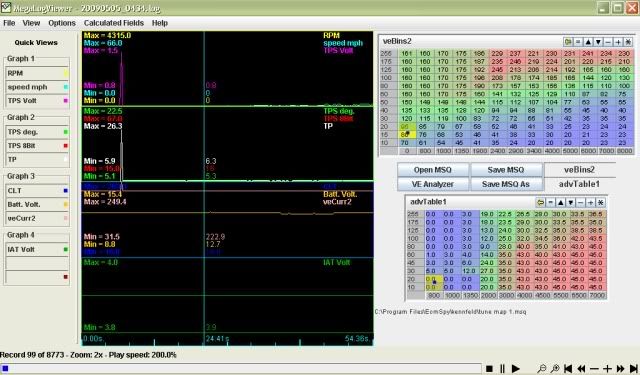
Make sure the Ve bins 2, on the top button put your pointer over it and a drop down list come up and click on Ve bins2 ( this is your rear cylinder map and the only one you want to run in the ve analyzer. It has the 02 sensor in it and the front cylinder makes its adjustment to what the rear cylinder does.) The bottom one is just for you viewing pleasure. At this point its good to just fool around with megalog and and see what does what and play with the buttons. I always make sure that one of my graphs is set to AFV so I can see what is going on. If its higher than 100% you ecm is having to add fuel if its below 100 its removing fuel. You will need that info later on when you get deep into tuning. You dont need to set the graphs or anything to run the analyzer but its cool to see your ride and what your bike is doing.
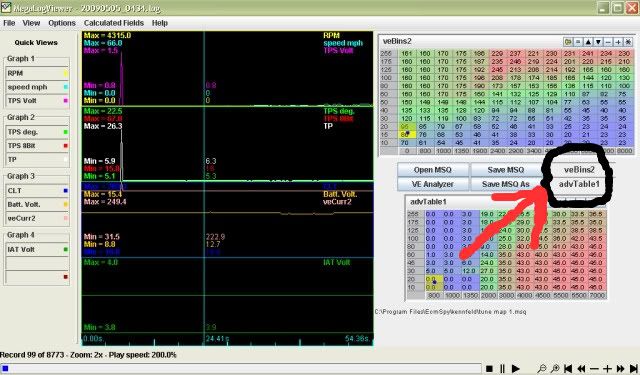
Now press the VE analyzer button.
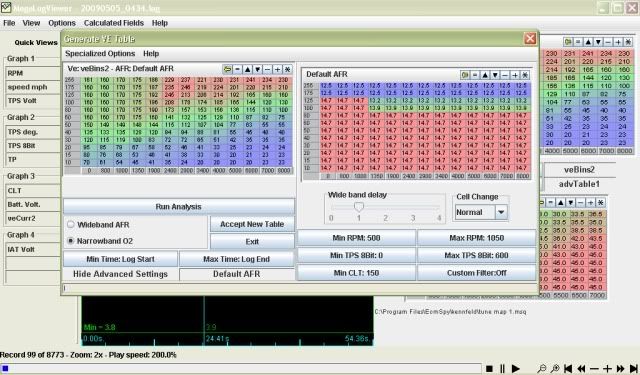
This should come up and click on advanced settings, it does not look like a button but it is, just put your pointer on it and left click. Make sure the temp is at 150 and cell change is at normal. then press the analyze button. These are filters, also at the top of the page under specialized filters make sure the box for (disable overrun filter) is not checked.
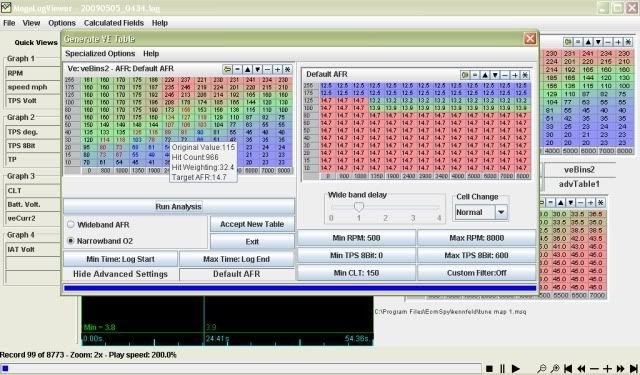
It will do its thing and try to change everything to get the bike to run a 14.7. You should see the numbers turning blue. Blue is adding pulse width and red is taking it away. you can put your pointer over the cell and see the change it made. If I had any numbers go red I put them back to the original numbers for now. You can click on the cell and use the buttons on the top right of the map to move the numbers up or down.
After it runs the press accept new table.
Back on this page
Press (Save MSQ As) then name the map and save it. I named mine as Tune Map so I know what one I need to load.
Now open ECMspy and fetch eeeprom from bike. Go to your fuel map page
Under File menu click on your map you just save (mine would be Tune Map) Your new map will come up, go to your rear map. Highlight your entire rear map, right click and copy
then go to the front map.
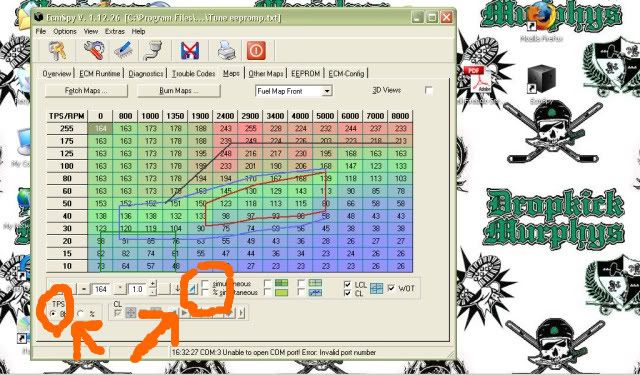
Make sure you check tps 8 bit and these boxes are unchecked
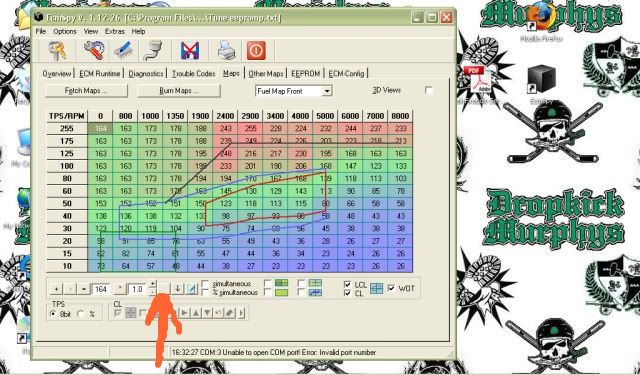
Then highlight the entire front cylinder map and hit paste. then with the entire map highlighted add two by pressing the up arrow button. Mine does not show the arrow but its this button. Your front map always needs to be richer than the rear by at least 2 points, I run mine at a 3 point difference.
Then make sure both maps look ok and no funky numbers are on the maps like a 0 or a number thats 100 point difference than the numbers around it , if your comfortable with it press burn maps to ecm and answer yes and follow instruction. make sure you turn your key off for a few seconds. Then save those maps again, it should go to Kenfield but make sure. Name it some thing new I named mine Tune Map 1 so I can always go back to a safe map if I ever need to start over and I have had to start over.
Part 2 coming soon. Your Next step in tuning. We will be turning a few things off and locking the AFV to get good numbers. You should already feel a difference in the bike.
Popping in the exhaust is normal and hard to remove but it can be done.

Why the hell is this not a "Sticky" yet?
GATORBUELL - YOU ARE THE MAN!!
Great post Gator. Looking forward to part 2.
Nice simple breakdown, wish I would have had this when I first used Spy last year! Thread should be called "ECM Spy for Dummies" like the books! Very cool as Spy can be very overwelming at first.
Matt
You need to be using the "afrBins2" rather than the "Default AFR" when using the VE Analyzer. Also set your Min CLT to 135.
Ok, Part two.
So now you have your first map or two and when you ran the Ve analyzer all the numbers that changed were blue.
When your ready to log again open ECMspy while connected to the bike and fetch EEEPROM.
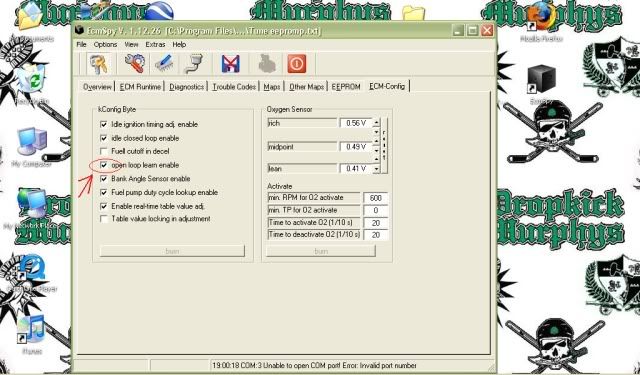
Now open the ECM-config page, and uncheck the Open loop learn enable box and click the burn button
Now under (Other maps) tab Change the Default open loop delay to 0. Do this by clicking on the number 3 then in the open box with equal sign next to it a highlighted 3 will appear. Just hit 0 then the = and it will change. Then hit burn.
Then in the AFV boxes change the numbers to 100 on both sides the same way you changed the number 3 in the delay
box. Now rest your AFV at 100, and go for a ride.
When you lock out the AFV (Adaptive Fuel valve) your ecm cant make changes to the fuel map to compensate for the information it gets from the sensors. You will then get constant numbers instead of megalog chasing it around.
When you return from your ride, run the VE analyzer and make the change to your map. You will probably get a lot of red numbers but thats ok megalog is just trying to get stoich. Load the new map to your bike making sure you Copy the rear map to the front and add two. From this point I usually save my new map under Tune Map every time I run the VE only saving the map then copy it under a different name when I feel the bike is running perfect and the AFV stays at 100. Make sure you tune with the same map you just adjusted every time.
Now you need to go back to ecmspy and put everything back to normal, check the open loop learn box and the 3 second delay and the AFV back to 140 max and 80 min and you burn everything. Dont for get to reset the AFV. Make sure you look everything over so that all the numbers jive and nothing looks out of place.
Now start the log again and go for another ride and ride the crap out of it. Go up threw the gears, slow, med and fast, go threw some corners and do some cruising at highway speed.
Return and stop the log. Now go to the megalog folder( My computer, C: drive, program folder, Ecmspy, Megalog, and click on the file log you just made. Megalog will automaticly name the file, it's the date and time (20090305_0930) Year, month, day_ 24 hour clock.
Now open the file and change the graphs to what ever you want but make one of them is the AFV. You do this by putting the pointer over a box and a drop down menu will show. Then click on AFV.
If you can see the AFV in the graph shows the high number is 116. This shows the AFV had to add 116% of the value of the pulse width of that cell to get to stoich or 14.7. If it shows a number below then the AFV had to take away fuel.
This was one of my first logs. Note : If you right click on the graph itself you can jump to a high or low number like rpm, speed, AFV, spark, battery Volt ect. or enter a specific number your looking for. This helps when looking for a specific area of the map that needs adjusting when you get into advanced tuning.
Do this whole process over and over again until the graph shows your AFV at 100 in both the high and low numbers.
Make sure you Copy the rear map to the front and add 2 every time.
Once you have 100 afv top and bottom in megalog graphs then you can still log and try to get the cells you hardly get. Just change the Easy to hard on the cell change. This just makes megalog require more information to change the cells. This will give you less back and forth with the cell changes each time you run the VE. After awhile you will notice the cells moving back and forth only one or two numbers each time. You can also move the rpm filters around to target areas specifically with out changing the entire map every time.
This is as far as I have gotten with the logging. I have a wideband LC-1 heated 02 sitting on my shop bench waiting to go in so thats next.
Feel free to add anything I missed or cool tricks I did not post. Hope this helps and dont hesitate to ask questions.
I know Mike sets his stuff at that and that works but if you set the clt at 135 you may be logging in the cold start enrichment and my throw your logs off. I keep mine at 150 just in case. I forgot to add afrbins 1 or 2 but the default will not hurt as long as you are not running with the open loop learn enable off all the time. Some do and just rely on the map itself but without a wideband 02 sensor tune on both cylinders I would not trust it.You need to be using the "afrBins2" rather than the "Default AFR" when using the VE Analyzer. Also set your Min CLT to 135.
Awesome Stuff Gator - Way to share the wealth.
Here is another good how to write up on various ecmspy tuning.
http://www.musclecross.com/forum/viewtopic.php?id=194
 Posting Permissions